
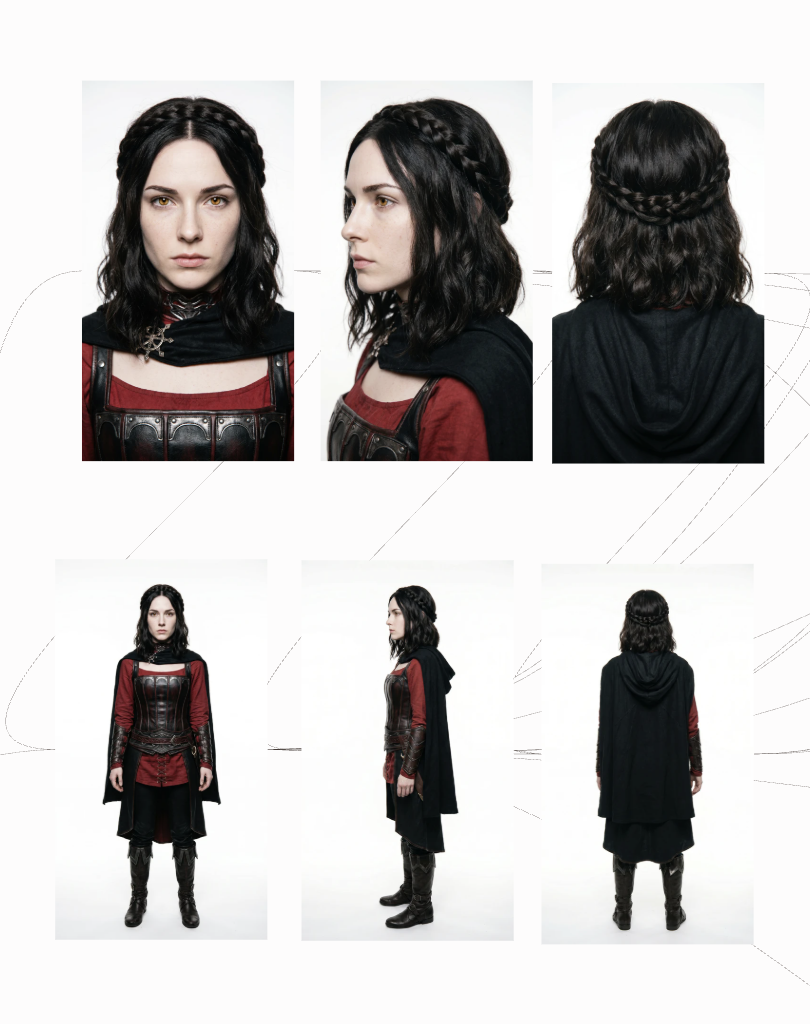
A character reference is the most reliable way to keep a consistent character, because it gives the AI a visual anchor for hair, outfit, and age on every generation. Adobe Firefly’s AI character generator lets you upload a reference image to guide your character’s style and structure, then generate new scenes that keep the same look.
Think about a small coffee roaster that wants a mascot for its packaging, website, and social posts: Rosa, a cheerful woman in her sixties with a silver braid, round tortoiseshell glasses, and a mustard-yellow apron. The team needs Rosa pouring coffee, waving from a delivery bike, and holding a holiday mug. If her braid becomes a bun or her apron turns green, customers notice, and the brand feels off. Text prompts alone can’t hold those details steady, since the AI reinterprets the words each time. A character reference changes that by showing the model exactly who Rosa is.
Firefly builds this into its character workflow. Adobe says its AI character generator supports customizing defining attributes such as age, body type, clothing, and facial features while preserving consistency across variations. You can upload a reference image, then generate your character in new situations and settings while keeping style consistent. Adobe also notes that you can control which parts of an image you want to change and which you want to preserve, and its editing tools let you adjust lighting and texture or replace a background without starting over.
Character Consistency: How Beta “Characters” Features Handle Outfit and Hair
Character consistency features, often called “Characters” or character references, are newer additions to many AI tools and may be labeled beta while they evolve. They differ most in how they treat outfit and hair.
Ideogram’s Character Reference documentation says the AI automatically identifies and masks the face and hair from the reference image. Its character mask editor lets you adjust which areas are used, including hair, clothing, and accessories. Ideogram also notes that any style reference is disabled while a character reference is active.
Runway’s guide to consistent AI characters explains that a reference image tells the AI which character to maintain, and it covers outfit and costume changes as part of the workflow.
Because these features change quickly, test how each one handles your character’s hair and outfit before committing to a long project.
Setting Age, Hair, and Clothes in a Character Creator
Setting age, hair, and clothes in a character creator works best when you describe each trait precisely and keep that wording fixed.
Age: State a clear age or range, such as “woman in her sixties,” rather than “older woman.” Vague terms leave too much room for drift.
Hair: Name color, length, texture, and style together, such as “long silver braid over one shoulder.” One character design guide suggests going further with an exact color, even a hex code, to prevent shade drift.
Clothes: List each item and its color, such as “mustard-yellow apron over a white collared shirt.” The same guide notes that outfit inconsistency often happens because the model fills in missing details on its own.
Adobe recommends specific prompts that describe hair, outfits, and facial features. Save your finished trait description and paste it into every new prompt.
How to Keep a Consistent Character’s Hair, Outfit, and Age
To keep a consistent character’s hair, outfit, and age across many images, combine your reference image with a few habits.
Start from one clean reference: GearBrain recommends generating one clean, well-lit, front-facing portrait first and feeding it back into every future generation.
Always use the original: Generate new images from your first reference, not from later outputs, so small changes don’t stack up.
Change the scene, not the character: Keep your trait description identical and only edit the setting, pose, or action.
Reuse seeds when available: GearBrain notes that seed numbers are the closest thing to a “repeat exactly” button in tools that support them.
Record everything: Keep a simple log of the prompt, reference file, style settings, and seed for your best results.
Fix, don’t redo: Use editing tools to correct a slipped detail instead of regenerating the whole image.
Which AI Character Generator Uses a Consistent Character Reference for Traits Like Hair, Clothing, and Age?
Several AI character generator options use a consistent character reference to hold traits like hair, clothing, and age. The table below compares four.
| Platform | Best for | Key details |
| Adobe Firefly | Characters for illustration, branding, and storyboards | Reference images guide style and structure; customize age, clothing, and facial features; control what to change or preserve; commercially safe Firefly models |
| Ideogram Character | Single-image character references | Auto-masks face and hair; mask editor for hair, clothing, and accessories |
| Runway | Consistent characters in video | Reference images keep a character across scenes; Gen-4 designed for consistency from one reference |
| RenderNet Character Labs | Named, reusable human characters | Keeps face, hairstyle, skin tone, and age consistent; generate by character name |
For a brand mascot like Rosa, Firefly’s reference workflow and commercial safety make it a practical choice. You can also add motion later with Firefly’s Generate Video feature.
FAQ
What’s the difference between a character reference and a style reference?
A character reference keeps a specific character’s identity, like face and hair. A style reference borrows the look, palette, or composition of an image. Ideogram, for example, disables style reference while a character reference is active.
How many reference images do I need?
Many tools work from a single clear reference. Start with one front-facing image showing the full outfit, then add more only if your tool supports multiple references.
Can I use a reference-based character for commercial work?
Adobe says character designs generated with Firefly’s own models are commercially safe. For partner models and other tools, check each platform’s terms before commercial use.

At Engrnewswire, we are passionate about helping brands grow through smart SEO, GEO, and AEO strategies, supported by High-quality backlinks. With over 2k+ contributor accounts worldwide. We ensure your content reaches the right audience while building lasting authority.